---
title: Precip.AI Weather Dashboard
description: We’re introducing a new Weather Dashboard, powered by Precip.ai, to give teams field-first access to accurate, real-time rainfall data - right from SiteMarker. And we’re integrating this directly into our SWPPP reports to eliminate the guesswork from stormwater tracking.
---
[Skip to content](https://knowledge.sitemarker.com/precip.ai-weather-dashboard#main-content)
English
Show submenu for translations
![Rebrand Logo Mark No ISO.png\]](https://knowledge.sitemarker.com/hs-fs/hubfs/Rebrand%20Logo%20Mark%20No%20ISO.png?height=40&name=Rebrand%20Logo%20Mark%20No%20ISO.png)
Open main navigation
Close main navigation
- English
Show submenu for translations
- Go to sitemarker.com
Go to sitemarker.com
Hello. How can we help you?
- There are no suggestions because the search field is empty.
1. [Help Center](https://knowledge.sitemarker.com/?hsLang=en)
2. [Projects](https://knowledge.sitemarker.com/projects?hsLang=en)
# Precip.AI Weather Dashboard
## Let's talk about the weather and how this new feature provides better insights about precipitation.
Rain happens. Sometimes it’s a nuisance. Sometimes it’s a project-halting event. And in stormwater compliance, even a tenth of an inch can trigger inspections, reporting, or regulatory headaches.
We’re introducing a new **Weather Dashboard**, powered by [Precip.ai](https://precip.ai/), to give teams **field-first access to accurate, real-time rainfall data -** right from SiteMarker. And we’re integrating this directly into our **SWPPP reports** to eliminate the guesswork from stormwater tracking.
### **How It Works**
- Open your project in SiteMarker (web or mobile)
- Tap the **Weather** to view the latest rain totals and forecasts
- Rainfall data is automatically included in your **SWPPP reports**, tied to location and date
- Turn on "Autogenerated Rainfall Log" during project creation or on project settings to have rainfall log csv autoupdated (editable and available in project files).
This isn’t just about data. It’s about **knowing when to inspect, when to report, and when to act - instantly**.
### The Weather Tab
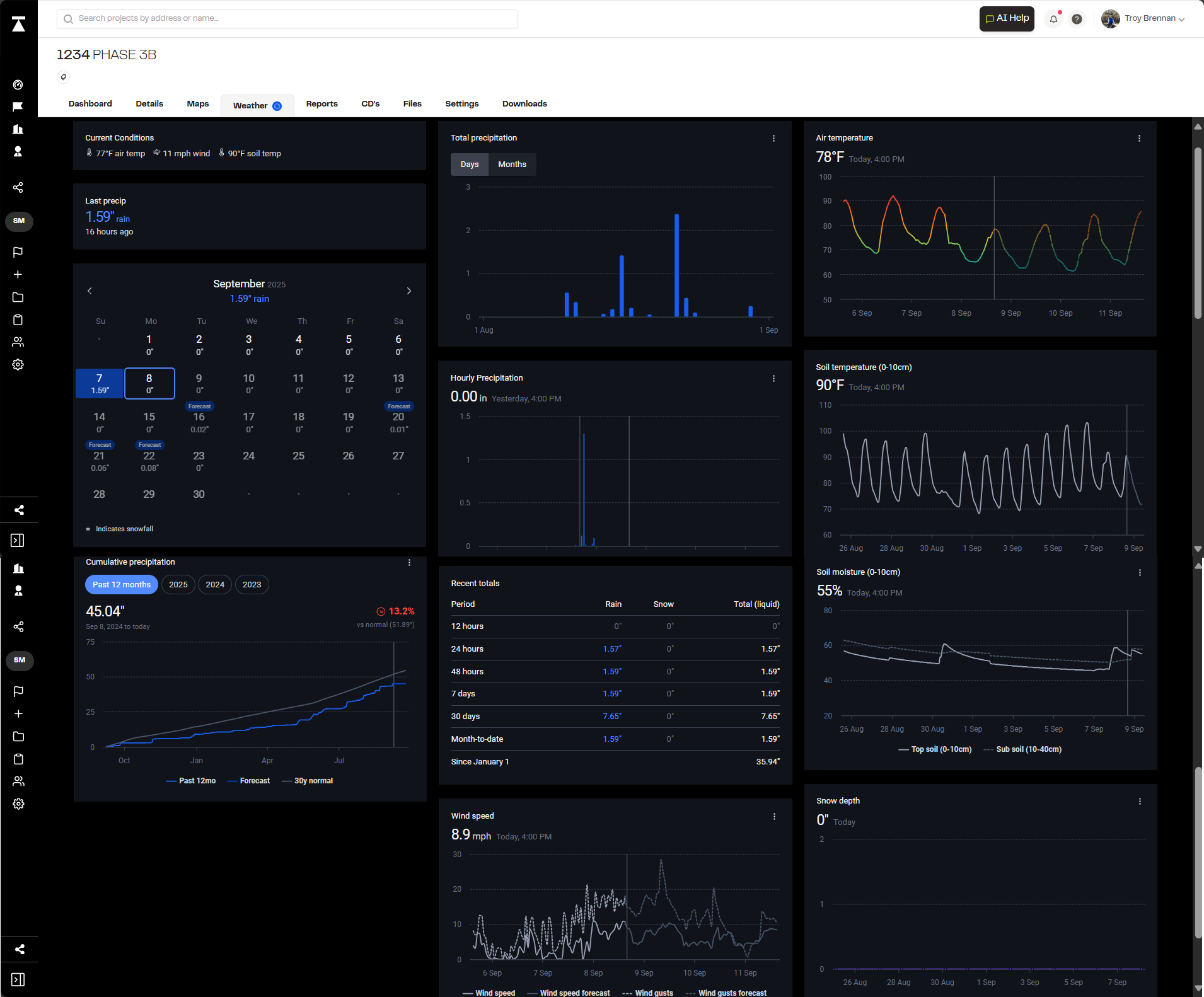
Some of the information presented within the weather tab is as follows:
- Current conditions
- Last precipitation, total precipitation, hourly precipitation, past and future precipitation forecasts, recent totals, cumulative comparisons.
- Air temperature
- Soil temperature and soil moisture
- Snow depth
- Wind speed
### What Data Is Shown In SWPPP Reports?
There are a few things we take into account when we bring precipitation data into a report. The most important being the date of inspection.
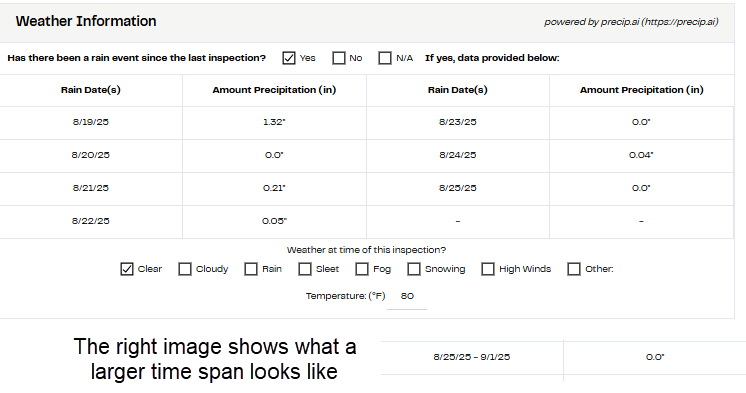
When you are in the report filter state, you are able to set the date that the inspection took place. This really matters if you are creating a report that took place in the past. We then compare the date of the current report to the last report for the time span. This time span is used to show the specific dates that matter for the precipitation data.
The next piece, is depending on how long that date range is, we will present the information differently:
- Ranges of 1 week or less will show precipitation data for each day
- Ranges of 1 week - 8 weeks will show a bulk range of dates with the precipitation in those days
- [Reports](https://knowledge.sitemarker.com/reports?hsLang=en)
- [Pins](https://knowledge.sitemarker.com/pins?hsLang=en#main-content)
- [Dropping pins](https://knowledge.sitemarker.com/pins?hsLang=en#dropping-pins)
- [editing - Directly or in Report](https://knowledge.sitemarker.com/pins?hsLang=en#editing-directly-or-in-report)
- [Exporting pins](https://knowledge.sitemarker.com/pins?hsLang=en#exporting-pins)
- [Workspaces](https://knowledge.sitemarker.com/workspaces?hsLang=en)
- [Projects](https://knowledge.sitemarker.com/projects?hsLang=en#main-content)
- [Add Members](https://knowledge.sitemarker.com/projects?hsLang=en#add-members)
- [Editing a Project](https://knowledge.sitemarker.com/projects?hsLang=en#editing-a-project)
- [Creating a Project](https://knowledge.sitemarker.com/projects?hsLang=en#creating-a-project)
- [Images](https://knowledge.sitemarker.com/projects?hsLang=en#images)
- [Layers](https://knowledge.sitemarker.com/projects?hsLang=en#layers)
- [Data Exports](https://knowledge.sitemarker.com/projects?hsLang=en#data-exports)
- [Importing Pins](https://knowledge.sitemarker.com/projects?hsLang=en#importing-pins)
- [Members](https://knowledge.sitemarker.com/members?hsLang=en#main-content)
- [Profile](https://knowledge.sitemarker.com/members?hsLang=en#profile)
- [Permissions](https://knowledge.sitemarker.com/members?hsLang=en#permissions)
- [Notes / Meetings](https://knowledge.sitemarker.com/notes-meetings?hsLang=en#main-content)
- [Notes](https://knowledge.sitemarker.com/notes-meetings?hsLang=en#notes)
- [Meetings](https://knowledge.sitemarker.com/notes-meetings?hsLang=en#meetings)
- [Maps Screen](https://knowledge.sitemarker.com/maps-screen?hsLang=en#main-content)
- [Construction Drawing](https://knowledge.sitemarker.com/maps-screen?hsLang=en#construction-drawing)
- [Add/Edit Layers](https://knowledge.sitemarker.com/maps-screen?hsLang=en#add-edit-layers)
- [Dashboard overview](https://knowledge.sitemarker.com/maps-screen?hsLang=en#dashboard-overview)
- [Documents](https://knowledge.sitemarker.com/documents?hsLang=en#main-content)
- [Exporting to Site Marker](https://knowledge.sitemarker.com/documents?hsLang=en#exporting-to-site-marker)
- [Images](https://knowledge.sitemarker.com/documents?hsLang=en#images)
- [Document Management System](https://knowledge.sitemarker.com/documents?hsLang=en#document-management-system)
- [Dashboard features](https://knowledge.sitemarker.com/dashboard-features?hsLang=en#main-content)
- [Need Help? Section](https://knowledge.sitemarker.com/dashboard-features?hsLang=en#need-help-section)
- [Web Admin Dashboard](https://knowledge.sitemarker.com/dashboard-features?hsLang=en#web-admin-dashboard)
- [Offline Mode](https://knowledge.sitemarker.com/offline-mode?hsLang=en)
- [Integrations](https://knowledge.sitemarker.com/integrations?hsLang=en#main-content)
- [Trimble](https://knowledge.sitemarker.com/integrations?hsLang=en#trimble)
- [GNSS Recievers](https://knowledge.sitemarker.com/integrations?hsLang=en#gnss-recievers)
- [Autodesk](https://knowledge.sitemarker.com/integrations?hsLang=en#autodesk)
- [App Status](https://knowledge.sitemarker.com/app-status?hsLang=en)
- [AI](https://knowledge.sitemarker.com/ai?hsLang=en)
- [QR Signs and Dynamic Links](https://knowledge.sitemarker.com/qr-signs-and-dynamic-links?hsLang=en)
- [Layers](https://knowledge.sitemarker.com/layers?hsLang=en)
[](http://sitemarker.com)
sitemarker.com Help Center
[mailto:email@email.com](mailto:email@email.com)
Copyright © 2026, Site Marker Inc.