![Rebrand Logo Mark No ISO.png]](https://knowledge.sitemarker.com/hs-fs/hubfs/Rebrand%20Logo%20Mark%20No%20ISO.png?height=40&name=Rebrand%20Logo%20Mark%20No%20ISO.png)
See what Descriptions are and how you can leverage them in your reports!
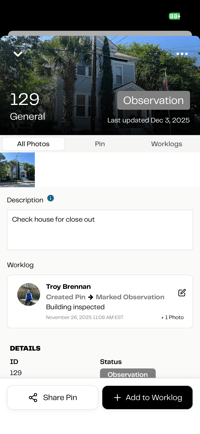
Descriptions are a new field on every pin that lets you give more context to the documentation you're creating. Think of it as your “headline note” — the first thing someone needs to know when looking at that pin.
-
It’s always visible in reports.
-
It sets the stage for all the follow-up worklogs added later.
-
It’s simple: the first note becomes the description.
How are Descriptions different from Worklogs?
Descriptions explain what the pin is about.
Worklogs track what happened after — like inspections, updates, or contractor notes.
Use the Description to answer:
“What is this pin showing or tracking?”
Use the Worklog to answer:
“What happened next?”
When is a Description created?
When you drop a pin and add your first note - that note becomes the Description automatically.
You don’t need to do anything extra.
Can I edit the Description later?
Yes. You can go back and edit the Description at any time — just like you can edit Worklogs.
Where does the Description show up?
-
In the app, under the pin details
-
At the top of the report section for that pin
-
Right before the worklogs, so reviewers see context first
Why did we add Descriptions?
Because projects don’t just need raw data - they need context.
Descriptions help tell the story behind the documentation, so teams can move faster, ask fewer questions, and make better decisions.